


Building ion channels and synapses#
In this tutorial, you will learn how to:
define your own ion channel models beyond the preconfigured channels in
Jaxleydefine your own synapse models
This tutorial assumes that you have already learned how to build basic simulations.
from jax import config
config.update("jax_enable_x64", True)
config.update("jax_platform_name", "cpu")

import matplotlib.pyplot as plt
import numpy as np
import jax
import jax.numpy as jnp
from jax import jit, value_and_grad

import jaxley as jx
First, we define a cell as you saw in the previous tutorial:
comp = jx.Compartment()
branch = jx.Branch(comp, ncomp=4)
cell = jx.Cell(branch, parents=[-1, 0, 0, 1, 1, 2, 2])
You have also already learned how to insert preconfigured channels into Jaxley models:
cell.insert(Na())
cell.insert(K())
cell.insert(Leak())
In this tutorial, we will show you how to build your own channel and synapse models. Alternatively, the Python toolbox DendroTweaks has built a tool to convert NMODL files to Jaxley channels, available here. We would appreciate both positive and negative experiences with this conversion tool: Please post feedback in the discussion here.
Your own channel#
Below is how you can define your own channel. We will go into detail about individual parts of the code in the next couple of cells.
import jax.numpy as jnp
from jaxley.channels import Channel
from jaxley.solver_gate import solve_gate_exponential


def exp_update_alpha(x, y):
    return x / (jnp.exp(x / y) - 1.0)

class Potassium(Channel):
    """Potassium channel."""

    def __init__(self, name = None):
        self.current_is_in_mA_per_cm2 = True
        super().__init__(name)
        self.channel_params = {"gK_new": 1e-4}
        self.channel_states = {"n_new": 0.0}
        self.current_name = "i_K"

    def update_states(self, states, dt, v, params):
        """Update state."""
        ns = states["n_new"]
        alpha = 0.01 * exp_update_alpha(-(v + 55), 10)
        beta = 0.125 * jnp.exp(-(v + 65) / 80)
        new_n = solve_gate_exponential(ns, dt, alpha, beta)
        return {"n_new": new_n}

    def compute_current(self, states, v, params):
        """Return current."""
        ns = states["n_new"]
        kd_conds = params["gK_new"] * ns**4  # S/cm^2

        e_kd = -77.0
        return kd_conds * (v - e_kd)

    def init_state(self, states, v, params, delta_t):
        alpha = 0.01 * exp_update_alpha(-(v + 55), 10)
        beta = 0.125 * jnp.exp(-(v + 65) / 80)
        return {"n_new": alpha / (alpha + beta)}

    def init_params(self, states, v, params, delta_t):
        return {}
Let’s look at each part of this in detail.
The below is simply a helper function for the solver of the gate variables:
def exp_update_alpha(x, y):
    return x / (jnp.exp(x / y) - 1.0)
Next, we define our channel as a class. It should inherit from the Channel class and define channel_params, channel_states, and current_name. You also need to set self.current_is_in_mA_per_cm2=True as the first line on your __init__() method. This is to acknowledge that your current is returned in mA/cm2 (not in uA/cm2, as would have been required in Jaxley versions 0.4.0 or older).
class Potassium(Channel):
    """Potassium channel."""

    def __init__(self, name=None):
        self.current_is_in_mA_per_cm2 = True
        super().__init__(name)
        self.channel_params = {"gK_new": 1e-4}
        self.channel_states = {"n_new": 0.0}
        self.current_name = "i_K"
Next, we have the update_states() method, which updates the gating variables:
def update_states(self, states, dt, v, params):
Every channel you define must have an update_states() method which takes exactly these five arguments (self, states, dt, v, params). The inputs states to the update_states method is a dictionary which contains all states that are updated (including states of other channels). v is a jnp.ndarray which contains the voltage of a single compartment (shape ()). Let’s get the state of the potassium channel which we are building here:
ns = states["n_new"]
Next, we update the state of the channel. In this example, we do this with exponential Euler, but you can implement any solver yourself:
alpha = 0.01 * exp_update_alpha(-(v + 55), 10)
beta = 0.125 * jnp.exp(-(v + 65) / 80)
new_n = solve_gate_exponential(ns, dt, alpha, beta)
return {"n_new": new_n}
A channel also needs a compute_current() method which returns the current through the channel:
    def compute_current(self, states, v, params):
        ns = states["n_new"]
        kd_conds = params["gK_new"] * ns**4  # S/cm^2

        e_kd = -77.0
        return kd_conds * (v - e_kd)
Finally, the init_state() and init_params() methods can be implemented optionally. The init_state() can be used to automatically compute the initial state based on the voltage when cell.init_states() is run. The init_params() can be used to automatically set parameters that depend on one another: For example, channel conductances might depend on the temperature. Running cell.init_params() will run the init_params() method of all channels.
⚠️ IMPORTANT!
Before implementing your own channel, make sure to also read theRequirements for channels and synapsessection at the end of this tutorial!
Alright, done! We can now insert this channel into any jx.Module such as our cell:
cell.insert(Potassium())
cell.delete_stimuli()
current = jx.step_current(1.0, 1.0, 0.1, 0.025, 10.0)
cell.branch(0).comp(0).stimulate(current)

cell.delete_recordings()
cell.branch(0).comp(0).record()
Added 1 external_states. See `.externals` for details.
Added 1 recordings. See `.recordings` for details.
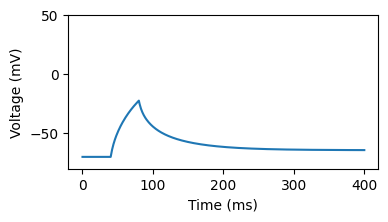
s = jx.integrate(cell)
fig, ax = plt.subplots(1, 1, figsize=(4, 2))
_ = ax.plot(s.T[:-1])
_ = ax.set_ylim([-80, 50])
_ = ax.set_xlabel("Time (ms)")
_ = ax.set_ylabel("Voltage (mV)")
If you want to set up detailed biophysical models using ion dynamics (e.g., ion pumps and ion diffusion), then we recommend reading this tutorial.
Your own synapse#
The parts below assume that you have already learned how to build network simulations in Jaxley.
Note that again, a synapse needs to have the two functions update_states and compute_current with all input arguments shown below.
The below is an example of how to define your own synapse model in Jaxley:
import jax.numpy as jnp
from jaxley.synapses.synapse import Synapse


class TestSynapse(Synapse):
    """
    Compute syanptic current and update syanpse state.
    """
    def __init__(self, name = None):
        super().__init__(name)
        self.synapse_params = {"gChol": 0.001}
        self.synapse_states = {"s_chol": 0.1}
        self.node_params = {"eChol": 0.0}
        self.node_states = {}

    def update_states(
        self,
        synapse_states,
        synapse_params,
        pre_voltage,
        post_voltage,
        pre_states,
        post_states,
        pre_params,
        post_params,
        delta_t,
    ):
        """Return updated synapse state and current."""
        s_inf = 1.0 / (1.0 + jnp.exp((-35.0 - pre_voltage) / 10.0))
        exp_term = jnp.exp(-delta_t)
        new_s = synapse_states["s_chol"] * exp_term + s_inf * (1.0 - exp_term)
        return {"s_chol": new_s}

    def compute_current(
        self,
        synapse_states,
        synapse_params,
        pre_voltage,
        post_voltage,
        pre_states,
        post_states,
        pre_params,
        post_params,
        delta_t,
    ):
        g_syn = synapse_params["gChol"] * synapse_states["s_chol"]
        return g_syn * (post_voltage - post_params["eChol"])
As you can see above, synapses follow closely how channels are defined. The main difference is that the update_states and compute_current methods takes two voltages: the pre-synaptic voltage (a jnp.ndarray of shape ()) and the post-synaptic voltage (a jnp.ndarray of shape ()).
In addition, the update_states and the compute_current methods also receive pre_states, post_states, pre_params, post_states. These are dictionaries which contain the compartment states of the pre- and post-synaptic compartment. By default, however, they are empty. In order to fill them with attributes, you have to specify them in node_params (to get access to parameters in pre_params and post_params) and node_states (to get access to parameters in pre_states and post_states). In our example above, we run
self.node_params = {"eChol": 0.0}
Because we do this, we can later (in compute_current) run
return g_syn * (post_voltage - post_params["eChol"])
In other words, we can access the post-synaptic parameter "eChol". Note that the values listed in node_params or node_states (such as "eChol") will be stored in net.nodes, whereas synapse_params and synapse_states (like "gChol") will be stored in net.edges.
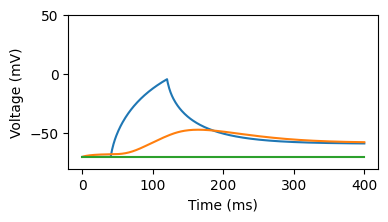
net = jx.Network([cell for _ in range(3)])
from jaxley.connect import connect

pre = net.cell(0).branch(0).loc(0.0)
post = net.cell(1).branch(0).loc(0.0)
connect(pre, post, TestSynapse())
net.cell(0).branch(0).loc(0.0).stimulate(jx.step_current(1.0, 2.0, 0.1, 0.025, 10.0))
for i in range(3):
    net.cell(i).branch(0).loc(0.0).record()
Added 1 external_states. See `.externals` for details.
Added 1 recordings. See `.recordings` for details.
Added 1 recordings. See `.recordings` for details.
Added 1 recordings. See `.recordings` for details.
s = jx.integrate(net)
fig, ax = plt.subplots(1, 1, figsize=(4, 2))
_ = ax.plot(s.T[:-1])
_ = ax.set_ylim([-80, 50])
_ = ax.set_xlabel("Time (ms)")
_ = ax.set_ylabel("Voltage (mV)")
Requirements for channels and synapses#
Above, we showed the general structure that your own channels and synapses should have. We now turn to some coding requirements and conventions that have to be followed in Jaxley:
Throughout channels and synapses, you should use
jnp(jax.numpy), notnp(numpy). For example, usejnp.exp(), notnp.exp().Within the
update_statesandcompute_currentmethods, do not useself.channel_paramsorself.channel_states. Instead, use theparamsorstatesthat are passed to these functions. For example, do:
def compute_current(self, states, v, params):
    ns = states["n"]  # Do not use: self.channel_states["n"]
    kd_conds = params["gK"] * ns**4  # Do not use: self.channel_params["gK"]
    # ...
If you want to share parameters across channels (e.g., have the same reversal potential for multiple potassium channels), then you simply have to give them the same name in the
channel_params(for example,eK, not prefixed with the channel name).In channels and synapses, do not use
ifstatements, but usejax.lax.select. For examples inJaxleychannels, see here or here.To debug your own channel models, you might want to perform voltage-clamp experiments. In
Jaxley, you can do this with the.clamp()method. For example:
cell = jx.Cell()
cell.insert(K())
cell.record("i_K")  # Record the `current_name`.

delay, dur, amp, baseline, dt, t_max = 10.0, 10.0, 100.0, -70.0, 0.025, 200.0
clamped_voltage = jx.step_current(delay, dur, amp, dt, t_max) + baseline

cell.clamp("v", clamped_voltage)
channel_current = jx.integrate(cell, delta_t=dt)
That’s it! You are now ready to build your own custom simulations and equip them with channel and synapse models!
If you want to set up detailed biophysical models using ion dynamics (e.g., ion pumps and ion diffusion), then we recommend reading this tutorial. If you have not done so already, you can check out our tutorial on training biophysical networks which will teach you how you can optimize parameters of biophysical models with gradient descent.